Heat Haze
Task
Your goal is to implement a heat haze effect in a graphics application. The effect should simulate shimmering air above hot surfaces (candle flame) by distorting the rendered scene in a selected region.
Screen-aligned billboard, where the effect must be applied, is already rendered in the correct place above the candle flame.
Read the theory and complete all the TODO comments in the code to achieve the desired result.
Theory
When you look at a candle flame, the air above it seems to shimmer. Objects seen through this rising air look wavy, and their outlines bend as if they are melting. This is heat haze: a real-world optical effect caused by hot air rising and mixing with cooler air. The different temperatures change the density of the air, which changes how light bends (refraction). Our eyes see this bending as a moving, watery distortion.
In computer graphics, we don’t simulate actual physics of air density because it would be far too complex. Instead, we fake the effect by slightly shifting the background image in small, animated patterns. The trick is to make the distortion subtle and constantly moving, so it feels alive.
Algorithm
Heat haze is a post-processing effect. This means we first render the scene normally, and then apply distortion only in selected areas. Below is a clear step-by-step description of how the algorithm works:
1. Render the Scene into a Texture
First, we draw the whole scene without any distortion into a texture. This texture will be our base image.
2. Make a Copy of the Texture
We need to distort parts of the scene later. But the GPU does not allow reading and writing to the same texture at the same time. So we make a copy of the scene texture: one for reading (sampling) and one for writing (drawing the new distorted result).
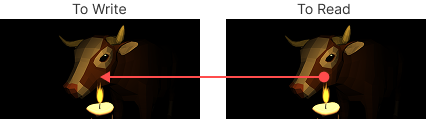
3. Draw Quads in Hot Areas
In places where heat haze should appear (for example, above fire or a candle), we draw screen-space aligned quads. These quads mark the regions where distortion will be applied.
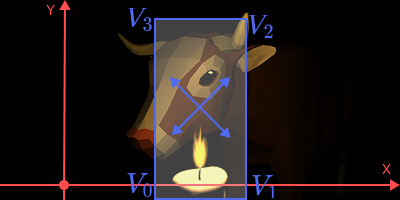
4. Fragment Shader
Inside the fragment shader of these quads:
- read the part of the scene texture that the quad covers;
- apply distortion to the texture coordinates;
- draw the distorted pixels back over the original scene.
4.1 Converting Quad Fragment Position to Screen Coordinates. To know which pixels of the scene are covered by the quad, we convert each fragment’s position first to NDC (Normalized Device Coordinates):
vec3 ndc = vPosProj.xyz / vPosProj.w;
then to texture coordinates in the range $[0,1]$:
vec2 uvScreen = ndc.xy * 0.5 + 0.5;
4.2 Distortion. We use a DuDv map (a texture with distortion vectors). Additionally, to make the haze move, we scroll the coordinates over time:
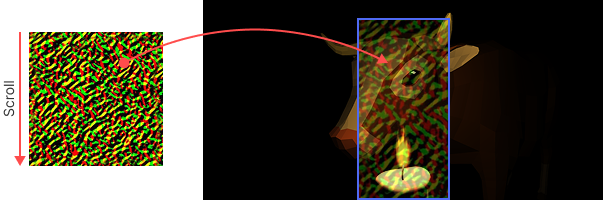
vec2 scroll = vec2(0.0, iTime * SCROLL_Y);
// fract wraps coordinates so they stay in [0,1].
vec2 uvScrolled = fract(vUv - scroll);

vec2 dudv = texture(frameBuffer, uvScrolled).rg;
dudv = dudv * 2.0 - 1.0; // remap [0,1] to [-1,1]
For sampling the DuDv map, we can use the quad’s regular texture coordinates (uv), not the screen-space coordinates.
4.3 Control Distortion Strength. We can multiply the distortion by a coefficient to make the effect stronger or weaker:
dudv *= DISTORION_STRENGTH;
4.4 Sample Frame Buffer with Distorted Coordinates. After calculating the distortion offset from the DuDv map, we use these values to shift the sampling position of the scene texture. This step actually produces the shimmering heat haze effect, because the background pixels are read from slightly different positions than their original ones:
FragColor = texture(FrameTexture, uvScreen + dudv);
4.5 Masking the Distortion. If we only draw quads, the edges will look like hard rectangles:
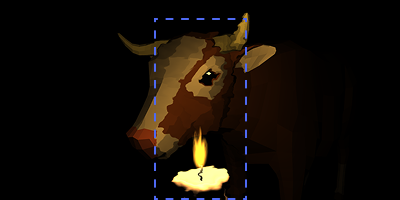
This is not natural. To fix this, we apply a mask that smoothly reduces distortion near the edges. For example, a circular mask:
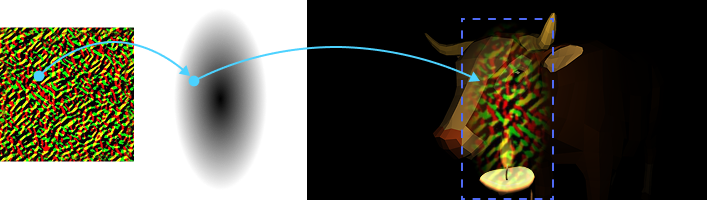
float circle = 1.0 - smoothstep(0.0, 0.5, distance(vec2(0.5), vUv));
dudv *= circle;
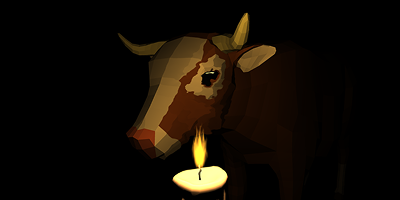
This makes distortion fade out toward the edges of the quad, giving a soft, natural look:
Summary
- The scene is rendered normally.
- Distorted quads are drawn on top, using DuDv maps and scrolling to simulate moving hot air.
- A mask softens the edges, so the haze blends smoothly into the scene.
The effect looks like shimmering air above a candle or fire, and feels natural to the viewer.