Screen-Aligned Billboards
Task
You are given a program that renders a candle with a glowing halo effect. The halo is represented by a two‑sided quad that initially has all four of its vertices collapsed into the same position at the candle’s wick. Each vertex carries a unique index attribute (0, 1, 2, 3) and uv coordinates.
Your goal is to modify the program so that, in the vertex shader, you use the per‑vertex index to expand the collapsed quad into a square of size 0.5 units. This expansion should happen in view space, so that the quad is stretched along the camera’s $X$ and $Y$ axes. As a result, the halo will always remain parallel to the screen and therefore always face the viewer, no matter how the camera rotates around the candle.
Theory
In computer graphics, a billboard is a flat 2D object (usually a rectangle or quad) that always faces the camera. It is often used for things like:
- trees in old 3D games
- smoke or fire particles
- text labels above characters
The trick is that the billboard looks correct from any angle, because it is always parallel to the screen.
Starting with a Collapsed Quad
Imagine we have a quad (a rectangle made of 4 vertices). At first, all its vertices are placed at the same point. This means the quad has no size - it is collapsed into a single dot:
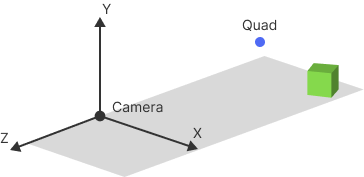
Moving into View Space
When we transform this point into view space (camera space), the point is now located relative to the camera:
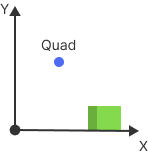
In view space:
- the camera is at the origin (0,0,0).
- the camera looks along the negative $Z$ axis.
- the $X$ and $Y$ axes define the plane of the screen.
4. Stretching Along X and Y
Now we "stretch" the quad along the $X$ and $Y$ axes in view space:
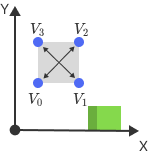
This creates a rectangle in the $XY$ plane. The normal of this rectangle points along the $Z$ axis:
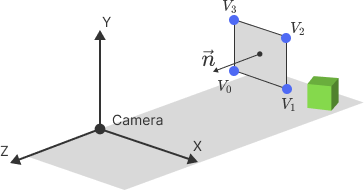
Because the screen is also aligned with the $XY$ plane, the quad is parallel to the screen. So, no matter where the camera is, the quad will always face it.
Projection & Texturing
Once the quad is in place, the projection matrix transforms it into clip space and eventually into screen space, while the texture coordinates attached to the vertices are carried along. As the quad is rasterized, those coordinates are interpolated across its surface, and the fragment shader samples the texture directly to determine the color of each pixel. The result is a flat image that always faces the viewer, shaded with whatever sprite or particle texture you choose, and blended into the scene with transparency or additive effects depending on the look you want.
Key Idea
If you collapse a quad into a point, move it into view space, and then stretch it along X and Y, it will always be parallel to the screen - perfect for billboards.