Atan
Task
Create a gradient that transitions from red to green. The weight of each pixel should be determined by the angle between the center-to-pixel ray and the x-axis. Limit the gradient to a circular area with a diameter equal to the height of the texture. Use 3.14 as the approximate value for $\pi$.
Notes
Perform all calculations after adjusting the coordinates for the aspect ratio.
Theory
In GLSL, the atan(y, x) function is used to calculate the angle in radians between the positive x-axis and the point (x, y) in a 2D Cartesian coordinate system. This function is commonly used in computer graphics and shader programming to determine the direction of a vector or to perform rotations based on the angle between two points.
Function Signature
float atan(float y, float x);
How It Works
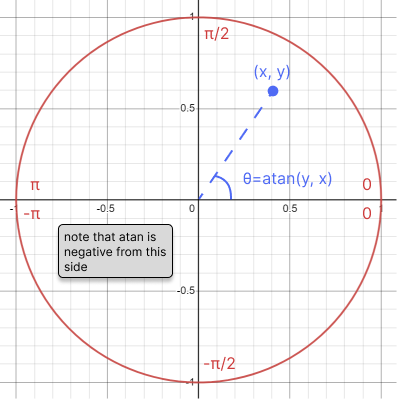
The atan(y, x) function computes the arctangent of y/x within the range [-π, π]. The resulting angle is positive if the point (x, y) is in the first or second quadrant, and negative if it is in the third or fourth quadrant (Image 1). This function handles the sign of y and x appropriately to determine the correct quadrant of the angle.
Example
Here's an example of using atan(y, x) to rotate a 2D shape towards a target point:
float dx = targetX - positionX;
float dy = targetY - positionY;
float angle = atan(dy, dx); // Calculate angle for rotation
HLSL Equivalent
In HLSL, the exact same function exists under the name atan2. It behaves identically to atan in GLSL.