Clamp
Task
Write a program that draws a diagonal line from the bottom left corner of the texture to the top right corner. The line should have a width of 0.2 in normalized coordinates and be colored in (1.0, 0.3, 0.3). Additionally, ensure that the line is limited to values between 0.25 and 0.75 in Y coordinate.
Requirements
The shader should avoid using branching or conditional statements in its code.
Theory
In GLSL/HLSL, the clamp function is used to restrict a value within a specified range. It ensures that the input value is not less than a minimum value and not greater than a maximum value. The clamp function is commonly used in shaders to limit the output of calculations to a specific range, preventing values from going out of bounds.
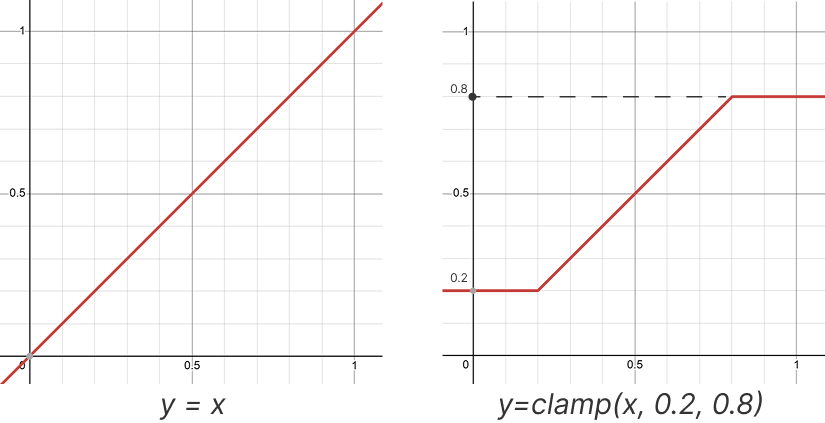
Function Signature
float clamp(float value, float minVal, float maxVal)
How It Works
The clamp function takes two arguments:
- value: The input value that you want to constrain within the specified range.
- minVal: The minimum value that
valueshould not go below. - maxVal: The maximum value that
valueshould not exceed.
The function returns the clamped value of value, which is constrained between minVal and maxVal.
Example
clamp(0.8, 0.0, 1.0);  // will be 0.8, since value is between 0.0 and 1.0
clamp(-0.5, 0.0, 1.0); // will be 0.0, since value is less than 0.0
clamp(1.5, 0.0, 1.0);  // will be 1.0, since value is greater than 1.0