dFdx / dFdy
Task
Write a shader that draws a red outline around the tree in a given picture with a transparent background.
To detect the edge of the tree, you need to measure how much the image brightness changes from one pixel to the next. Use the derivative functions to check how brightness changes along the X-axis and Y-axis. By adding these two values together, we get the strength of the transition. The stronger changes mean sharper edges.
To calculate brightness, use the luminance formula:
L = R * 0.2126 + G * 0.7152 + B * 0.0722;
Theory
In calculus, a partial derivative measures how a function changes as you vary one input while keeping others constant.
$ \frac{\partial f(x, y)}{\partial x}, \quad \frac{\partial f(x, y)}{\partial y} $
In fragment shaders, we often want to know how a value (like a texture coordinate, normal, or lighting term) changes across screen space horizontally $(X)$ or vertically $(Y)$.
But shaders don't have access to neighboring pixels directly. They only process one fragment at a time. So how do we estimate change?
Enter the Quad
The GPU solves this by executing fragment shaders in quads - 2×2 blocks of adjacent pixels:
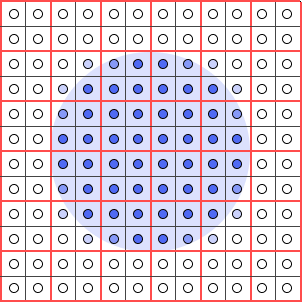
Each pixel in the quad runs the same shader, and the GPU knows the screen-space position of each one. This allows it to compare values between neighboring pixels and estimate how fast something is changing:
- to compute dFdx(variable) in GLSL or ddx(variable) in HLSL, the GPU subtracts the value of the pixel to the left from the pixel to the right.
- to compute dFdy(variable) in GLSL or ddy(variable) in HLSL, it subtracts the value of the pixel above from the pixel below.
This is a finite difference approximation of the derivative:
$ \frac{\partial f}{\partial x} \approx \frac{f(x + \Delta x) - f(x)}{\Delta x} $
Why It Matters
• Select mipmap levels. If texture coordinates change rapidly, a lower-resolution mipmap is used to avoid aliasing.
• Smooth procedural effects. Noise, bump maps, and lighting can be adjusted based on how fast inputs change.
• Detect edges. Sharp changes in values can be used for stylized rendering or edge detection.
Examples
// GLSL
vec2 texCoord = ...;
float rateX = dFdx(texCoord.x);
float rateY = dFdy(texCoord.y);
// HLSL
float2 texCoord = ...;
float rateX = ddx(texCoord.x);
float rateY = ddy(texCoord.y);
If rateX is large, it means the texture is stretched or compressed horizontally across the screen and the GPU can adjust sampling accordingly.