Dot
Task
Write a program that draws a triangle in the center of the screen. The triangle should have an apex at (0.5, 0.75) in normalized device coordinates, and an apex angle of 120 degrees. The height of the triangle should be 0.5 times the height of the screen.
Hint
First, we can shoot a ray h from the apex perpendicular to the base of the triangle. This h vector divides the top corner of the triange into two 60-degree parts.
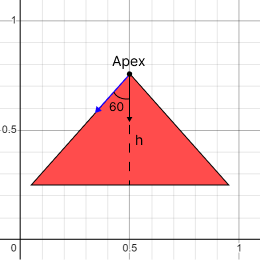
If we take the dot product of the height vector h and the vector from apex to the triangle bottom vertex, we get a value equal to the cosine of 60 degrees.
Think what happens to the value of the dot product when the fragment fits into a triangle and when it doesn't.
Theory
The dot calculates the dot product of two vectors. it can be used to calculate the angle between two vectors or to project one vector onto another.
float dot(float x, float y)
float dot(vec2 x, vec2 y)
float dot(vec3 x, vec3 y)
float dot(vec4 x, vec4 y)
Algebraic definition
The dot product of two vectors v1 and v2 is equal to the sum of the products of their corresponding components:
v1 * v2 = v1[0] * v2[0] + … + v1[n] * v2[n];
Geometrical definition
The dot product of two vectors v1 and v2 is equal to the product of their magnitudes and the cosine of the angle between them:
v1 * v2 = length(v1) * length(v2) * cos(angle between v1 and v2)
In the case when both vectors are normalized (vector length is equal to 1), the dot product is equal to cosine of the angle between two vectors:
v1 * v2 = cos(angle between v1 and v2);