Int / Floor
Task
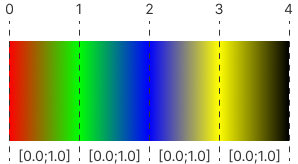
Create a shader program that generates a gradient image using an array of 5 colors. The colors are defined in the following array:
// GLSL
vec3 palette[5] = vec3[5]
(
    vec3(1.0, 0.0, 0.0),
    vec3(0.0, 1.0, 0.0),
    vec3(0.0, 0.0, 1.0),
    vec3(1.0, 1.0, 0.0),
    vec3(0.0, 0.0, 0.0)
);
//HLSL: must be inside a shader function (main)
float3 palette[5] = {
    float3(1.0, 0.0, 0.0),
    float3(0.0, 1.0, 0.0),
    float3(0.0, 0.0, 1.0),
    float3(1.0, 1.0, 0.0),
    float3(0.0, 0.0, 0.0)
};
The program should determine which color range the current pixel falls within and interpolate its color accordingly. This will result in a smooth gradient transition between the colors in the array.
Hint
Theory
Int Function
The int function in GLSL/HLSL is used to convert a floating-point value to an integer value by truncating the decimal part. It essentially removes the fractional part of the input value and returns the integer part.
Signature
int int(x)
Where x is a floating-point value that you want to convert to an integer. The output of the int function will be integer part of the input value x.
Example
float floatVal = 3.7;
int intVal = int(floatVal); // will be 3
Floor Function
The floor function rounds down the input value to the nearest integer value that is not greater than the input value.
Signature
float floor(float x)
Where x is a floating-point value that you want to round down to the nearest integer. The output of the floor function will be the largest integer less than or equal to the input value x.
Example
float val = 3.7;
float flooredVal = floor(val); // will be 3.0