Mix - Bilinear Interpolation
Task
To fill the screen using bilinear interpolation, follow these steps:
- Assign the color blue to the left-top corner of the screen.
- Assign the color red to the left-bottom corner of the screen.
- Assign the color green to the right-top corner of the screen.
- Assign the color black to the right-bottom corner of the screen.
- Use bilinear interpolation to blend the colors in between the corners and fill the screen with a smooth gradient.
Theory
Bilinear interpolation is a method used to determine the color of a pixel by performing linear interpolations in both the $X$ and $Y$ directions.
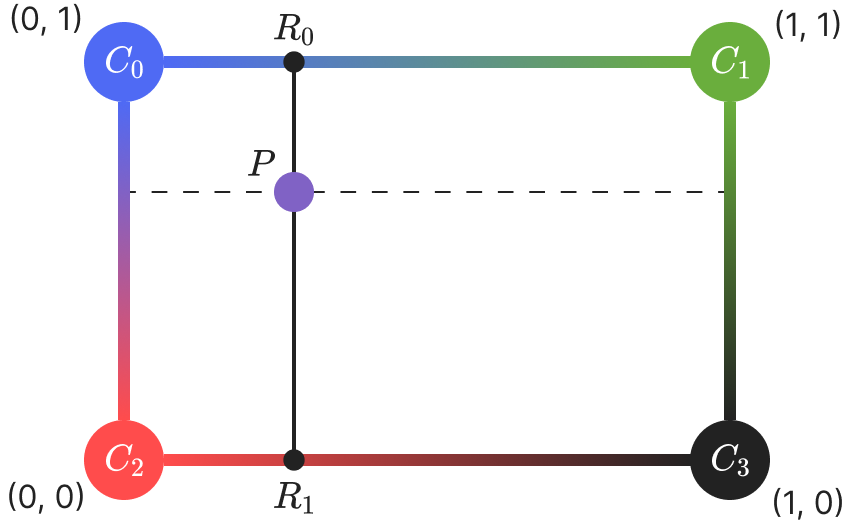
Implementation Steps
Identify the Colors. Identify the four surrounding points in the grid $C_0$, $C_1$, $C_2$, and $C_3$:
Linear Interpolation in the x-Direction. Perform linear interpolation between $C_0$ and $C_1$ to find $R_0$. Perform linear interpolation between $C_2$ and $C_3$ to find $R_1$.
Linear Interpolation in the y-Direction. Perform linear interpolation between $R_0$ and $R_1$ to find the interpolated value $P$.
This technique is commonly used in image processing and texture mapping to achieve smooth transitions between colors.