Smoothstep
Task
Create a gradient effect that smoothly transitions from red to green. The color change should be most noticeable between the x-coordinates of 0.25 and 0.75.
Requirements
The shader should avoid using branching or conditional statements in its code, and instead rely on the smoothstep and mix functions to determine the color of each pixel.
Theory
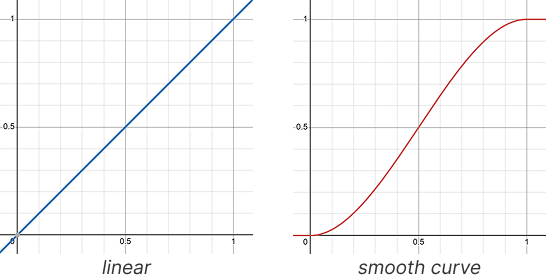
The smoothstep function is used to perform smooth interpolation between two values based on a third interpolation factor. This function provides a smoother transition compared to linear interpolation by applying a smooth curve to the interpolation process.
Function Signature
smoothInterpolation = smoothstep(edge0, edge1, x)
How It Works
The smoothstep function takes three arguments:
edge0: The lower threshold value.
edge1: The upper threshold value.
x: The interpolation factor.
Calculation details:
If
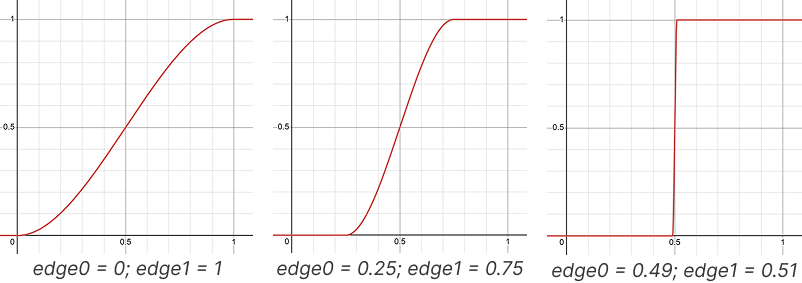
xis less than or equal toedge0, the result is0.If
xis greater than or equal toedge1, the result is1.If
xis betweenedge0andedge1, the result is smoothly interpolated between0and1using a Hermite interpolation function.
The Hermite interpolation function used by smoothstep ensures that the transition between 0 and 1 is smooth and continuous, resulting in a visually pleasing effect.
Examples
// result will be a smooth color interpolation between red and blue
vec3 out = mix(color1, color2, smoothstep(0.2, 0.8, factor));
In this example, the out color value is transitioning smoothly from 0.2 to 0.8 based on the factor value:
• When factor is less than 0.2: the smoothstep function evaluates to 0.0, resulting in the output being closer to color1.
• When factor is greater than 0.8: the smoothstep function evaluates to 1.0, resulting in the output being closer to color2.
• When factor is between 0.2 and 0.8: the transition is smooth and continuous, providing more control over where the blending occurs.