Texture
Task
Write a shader program that renders a texture on the screen. The texture is attached to the shader program through iChannel0. Lets assume the texture has a fixed aspect ratio of 1:1 (square). If the screen's aspect ratio causes the coordinates to exceed the $[0, 1]$ range, the shader must repeat the texture content rather than stretching it or leaving empty space.
Theory
On the CPU side, we can tell the GPU which texture we want to execute our shader program with. To access the texture that is attached to a shader program, you need declare a uniform of sampler2D type:
uniform sampler2D <Name>
To sample the color of the texture, use the built-in texture function that takes a sampler2D as its first argument and the corresponding texture coordinates as its second argument:
vec4 color = texture(<Name>, texCoord);
Texture coordinates range from (0, 0) for the lower left corner of the texture image to (1, 1) for the upper right corner of the texture image.
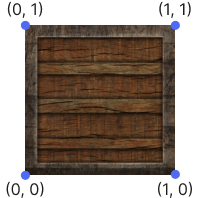
HLSL
In HLSL, textures and samplers are declared as separate global objects. These are bound to GPU resources from the CPU side and used to sample data from textures in the shader.
Texture2D tex : register(t0);
SamplerState samp : register(s0);
texis the texture resource.sampdefines how the texture is sampled (e.g., filtering, addressing mode).register(t0)andregister(s0)bind the texture and sampler to specific slots (t0,s0), which must match the bindings set by the rendering engine.
Names like tex and samp are just identifiers inside the shader. You can name them however you like.
To read the value from a texture in HLSL, we need to pass a sampler object and the pixel’s coordinates into the texture object's sampling method:
float4 color = tex.Sample(samp, texCoord);
Although both HLSL and GLSL use normalized texture coordinates ranging from (0.0, 0.0) to (1.0, 1.0), they interpret the origin point differently:
In GLSL (OpenGL), the coordinate
(0.0, 0.0)refers to the bottom-left corner of the texture.In HLSL (DirectX), the same coordinate refers to the top-left corner.
This means that sampling the same texture with identical uv coordinates may produce vertically flipped results between the two APIs.
Common solution: to avoid visual inconsistencies, developers typically flip the image vertically during GPU upload - either by reversing the row order in CPU memory or using a texture loading library that handles this automatically. This ensures that the texture appears correctly regardless of the coordinate system used by the shading language.