Tile Pattern
Task
Using tiling, repeat the pattern as many times as necessary.
Theory
A tile pattern is a repeating visual motif rendered across the screen. It is built using $UV$ coordinates and the fract function, which wraps values into the $[0,1)$ range, allowing seamless repetition.
Let's now break down the algorithm step by step to understand how this repetition is achieved:
1. Basic UV Coordinates
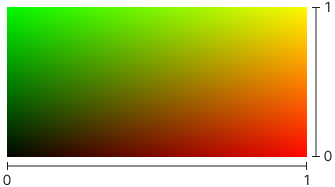
$ UV = \text{FragCoord} / \text{Resolution} $
It shows a gradient from black $(0, 0)$ in the bottom-left to white $(1, 1)$ in the top-right. Meaning each fragment on screen receives a unique $UV$ coordinate pair in the $[0,1]$ range.
2. Scaled UV Coordinates
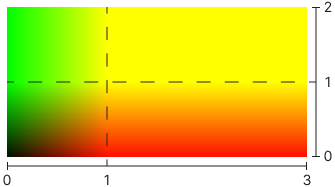
$ UV_\text{scaled}= UV * (\text{Columns} = 3, \text{Rows} = 2) $
We have increased the frequency of the pattern, so the coordinates exceed $[0,1]$ range. The gradient is stretched $3$ times along $X$, $2$ times along $Y$.
3. Taking a fractional part
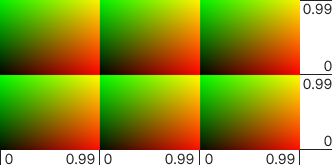
$ UV_\text{tiled} = \operatorname{fract}(UV_\text{scaled}) $
fract trims the coordinates, keeping only the fractional part. Each tile now has its own $UV$ in $[0,1)$ space, repeating the pattern. As result the screen is divided into $6$ identical tiles:
- $3$ across $X$
- $2$ across $Y$
Final Insight
Now that we've applied scaling and wrapped the $UV$ taking fractional part, we've effectively created a local coordinate system for each tile. This means we can now use $UV_\text{tiled}$ instead of $UV$ to draw any motif, and it will repeat seamlessly across the screen.
You can adjust the $Columns$ and $Rows$ values to change the size and density of the repeated cells. For example, increasing the number of columns and rows will create smaller, more densely packed cells.