Vector Normalization
Task
Write a shader program that divides the screen into two equal parts. The origin of the left part is at $(0.25, 0.5)$, and the origin of the right part is at $(0.75, 0.5)$. In the left part, display the cosine of the angle between the positive X-axis and the vector directed from the origin to the current pixel position. In the right part, display the sine of the angle between the positive X-axis and the vector directed from the origin to the current pixel position.
Theory
When working with vector values, we are often interested in the direction rather than the magnitude (length) of the vector. For example, when calculating lighting, we are interested in the direction of the illuminated surface's normal, the light rays, and the observer's view. In such cases, it is convenient to use unit vectors. A unit vector is a vector with a length of 1. It is also called a normalized vector.
For any non-zero vector $V$, we can calculate a unit vector $N$ that is directed the same way as vector $V$. This process is called vector normalization. To normalize a vector, we need to divide its components by its length:
N = V / length(V);
Or use the built-in normalize function:
N = normalize(V);
In 2D, if we draw a unit vector with its tail at the origin, its head will lie on a circle with a radius of 1 centered at the origin:
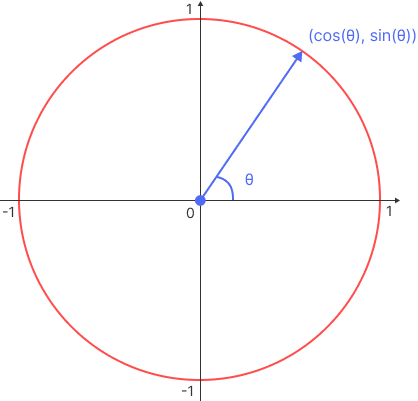
Thus, the components of a normalized vector can be represented using trigonometric functions:
$ N = ( \cos \theta, \sin \theta ) $
where $\theta$ is the angle between the vector and the positive X-axis.