Vertex Shader - Vertex
Task
Given a triangle object defined by 3 vertices. All it's vertices are located at the origin (0, 0, 0).
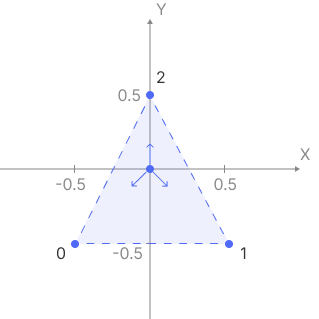
Write a vertex shader that uses the vertex index to appropriately move each vertex by 0.5 on the X and Y axes to produce a triangle on the screen.
Note: The output position must be a 4D vector in clip space, so make sure to set w = 1.0.
Theory
Vertex is a point in 3D space that defines the corners of geometric shapes and is used to construct the mesh of a 3D model. The mesh itself is typically made up of triangles, which are the simplest polygonal shapes that can define a surface in 3D space.
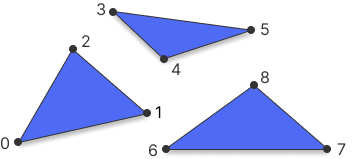
When rendering an object, the GPU starts with an array of vertices. These vertices are then processed by the vertex shader, which is one of the first stages in the graphics pipeline.
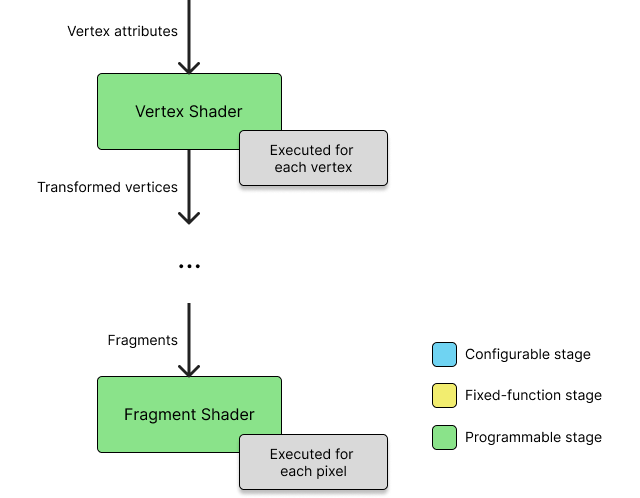
Vertex shader is responsible for transforming the vertex from its local position into Clip Space.
Clip Space is a standardized coordinate system used in the graphics pipeline to determine which geometry is potentially visible. After the vertex shader stage, vertex positions are expressed in clip space as 4D coordinates. Geometry that lies outside the clip space volume is subject to clipping and may be partially or entirely discarded. The exact boundaries of this volume depend on the graphics API.
OpenGL (GLSL)
In OpenGL, the vertex shader must assign the final position to the built-in variable gl_Position. This value is interpreted by the GPU as a position in clip space:
gl_Position = vec4(position.xyz, w);
OpenGL expects all three coordinates - x, y, and z - to be within the range $[−w; +w]$ . Any vertex outside this range will be clipped and not rendered.
DirectX (HLSL)
In DirectX, the vertex shader outputs a float4 with the semantic SV_Position. This value also represents a position in clip space:
float4 main(VSInput input) : SV_Position {
  return float4(input.position, w);
}
In DirectX, x and y follow the same range as OpenGL $[−w; +w]$ , but the z coordinate must be within $[0.0; +w]$ . This difference affects depth testing and visibility, and must be considered when designing projection logic or porting shaders between APIs.